My MPA Journey...
Step 3 - Make the "Hello Gopher" Online
Now is it time to raise the bar and make your Go MPA site (Step 2) available online. These steps will guide you through deploying your Go MPA site to a VPS and make it available online. In this part, we will enhance the folder structure, add fonts, add favicons and improve the SEO of the site.
Hello3 Live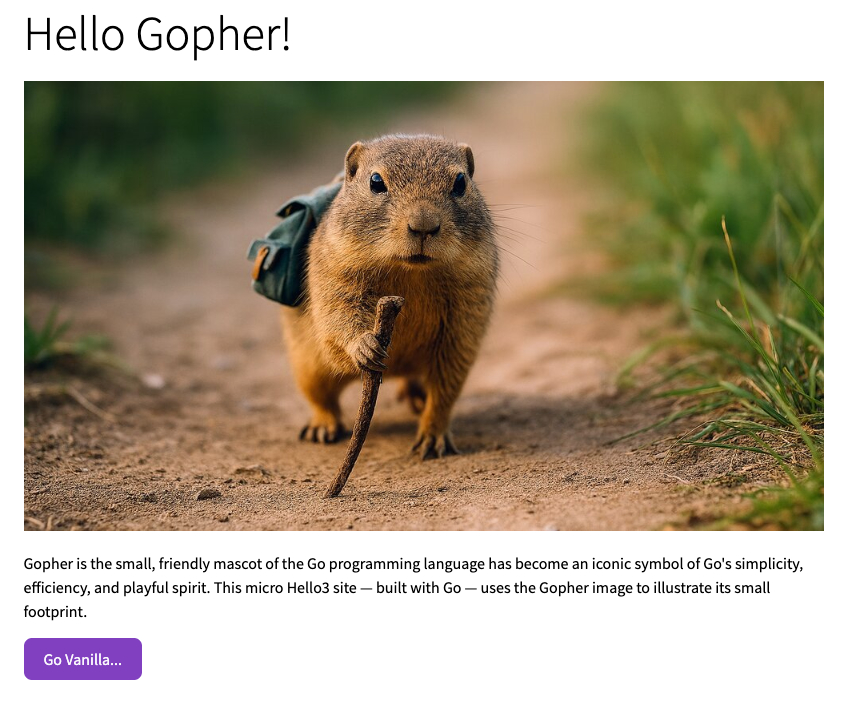
1. Expanded Folder Structure
Why this structure?
With this structure are basically all assets within the assets folder. Regardless if the
normally should be served in the root. Go serve these files as they were in the root. Just
simpler to manage.
── go/
    └── hello3/
        └── main/
            ├── assets/
            │   ├── css/
            │   │   ├── base.css
            │   │   └── fonts.css
            │   ├── favicons/
            │   │   ├── apple-touch-icon.png
            │   │   ├── favicon-16x16.png
            │   │   ├── favicon-32x32.png
            │   │   ├── favicon-96x96.png
            │   │   ├── favicon-192x192.png
            │   │   ├── favicon.ico
            │   │   └── favicon.svg
            │   ├── fonts/
            │   │   ├── source-sans-pro-v14-latin-300.woff
            │   │   ├── source-sans-pro-v14-latin-300.woff2
            │   │   ├── source-sans-pro-v14-latin-600.woff
            │   │   ├── source-sans-pro-v14-latin-600.woff2
            │   │   ├── source-sans-pro-v14-latin-regular.woff
            │   │   └── source-sans-pro-v14-latin-regular.woff2
            │   ├── img/
            │   │   ├── gopher.jpg
            │   │   └── gvp.jpg
            │   ├── seo/
            │   │   ├── robots.txt
            │   │   └── sitemap.xml
            │   └── tmpl/
            │       ├── components/
            │       │   ├── httphead.html
            │       │   └── httpend.html
            │       └── pages/
            │           ├── home.html
            │           └── gvp.html
            ├── go.mod
            ├── main
            ├── main.go
            └── init.go
2. assets - Add Base CSS and Font Styles
assets/css
CSS files are in the assets/css folder. The base.css file contains the main styles.
html, body {
    box-sizing: border-box;
    padding: 0;
    margin: 0;
    text-decoration: none;
    font-family: 'Source Sans Pro', sans-serif;
    height: auto;
    font-size: 16px;
}

body {
    display: flex;
    justify-content: center;
    min-height: 100vh;
    margin: 0;
}

section {
    padding: 15px;
}

img {
    width: 100%;
    max-width: 800px;
    height: auto;
}

.button {
    display: inline-block;
    background-color: hsl(270, 50%, 50%);
    border: none;
    color: hsl(270, 50%, 98%) !important;
    padding: 0px 20px 0px 20px;
    height: 42px;
    line-height: 42px;
    text-align: center;
    text-decoration: none;
    font-size: 1rem;
    border-radius: 8px;
    margin-bottom: 15px;
    margin-right: 15px;
}
/* source-sans-pro-300 - latin */
@font-face {
  font-family: 'Source Sans Pro';
  font-style: normal;
  font-weight: 300;
  font-display: block;
  src:
    local('Source Sans Pro Light'), local('SourceSansPro-Light'),
    url('../fonts/source-sans-pro-v14-latin-300.woff2') format('woff2'),
    url('../fonts/source-sans-pro-v14-latin-300.woff') format('woff');
}

/* source-sans-pro-regular - latin */
@font-face {
  font-family: 'Source Sans Pro';
  font-style: normal;
  font-weight: 400;
  font-display: block;
  src:
    local('Source Sans Pro Regular'), local('SourceSansPro-Regular'),
    url('../fonts/source-sans-pro-v14-latin-regular.woff2') format('woff2'),
    url('../fonts/source-sans-pro-v14-latin-regular.woff') format('woff');
}

/* source-sans-pro-600 - latin */
@font-face {
  font-family: 'Source Sans Pro';
  font-style: normal;
  font-weight: 600;
  font-display: block;
  src:
    local('Source Sans Pro SemiBold'), local('SourceSansPro-SemiBold'),
    url('../fonts/source-sans-pro-v14-latin-600.woff2') format('woff2'),
    url('../fonts/source-sans-pro-v14-latin-600.woff') format('woff');
}


h1 {
  font-size: 3rem;
  line-height: 2rem;
  font-weight: 300;
}

h2 {
  font-size: 3rem;
  line-height: 3rem;
  font-weight: 300;
  margin-bottom: 15px;
}

h3 {
  font-size: 1.5rem;
  line-height: 2.5rem;
}

p {
  font-size: 1rem;
  line-height: 1.5rem;
  margin-bottom: 15px;
  max-width: 800px;
}

/* scales with root font size */
#header h1 {
  font-size: clamp(24px, 3vw, 36px);
}
#header h2 {
  font-size: clamp(18px, 3vw, 24px);
}
3. assets - Add Favicon files
assets/favicons
Favicon files are in the assets/favicons folder. These are used to display the site's icon
in the browser tab and bookmarks.
Favicons created using
Realfavicongenerator
apple-touch-icon.png
favicon-16x16.png
favicon-32x32.png
favicon-96x96.png
favicon-1
92x192.png
favicon.ico
favicon.svg
4. assets - Add Fonts
assets/fonts
To avoid downloading fonts on every page load, we store them in the assets/fonts folder for
faster page load. You can download fonts from Google Fonts or other font providers.
Fonts dowloaded from Google Fonts
source-sans-pro-v14-latin-300.woff
source-sans-pro-v14-latin-300.woff2
source-sans-pro-v14-latin-600.woff
source-sans-pro-v14-latin-600.woff2
source-sans-pro-v14-latin-regular.woff
source-sans-pro-v14-latin-regular.woff2
5. assets - Add Images
assets/img
Images can be in different formats. webp is amongst the smallest and most efficient formats.
But not supported by all browsers yet. But good old jpg and png are still widely
used.
gopher.jpg
gvp.jpg
6. assets - Add SEO files
assets/seo
SEO files include robots.txt and sitemap.xml. These files help search engines understand and
index your site.
Created by Sitemap Generator
Sitemap: https://hello3.go4webdev.org/seo/sitemap.xml
User-agent: *
Allow: /
<urlset xmlns="http://www.sitemaps.org/schemas/sitemap/0.9" xmlns:xsi="http://www.w3.org/2001/XMLSchema-instance" xsi:schemaLocation="http://www.sitemaps.org/schemas/sitemap/0.9 http://www.sitemaps.org/schemas/sitemap/0.9/sitemap.xsd">
    <!--  created with Free Online Sitemap Generator www.xml-sitemaps.com  -->
    <url>
        <loc>https://mpa.go4webdev.org/gopher</loc>
        <lastmod>2025-11-28T16:27:13+00:00</lastmod>
        <priority>1.00</priority>
    </url>
    <url>
        <loc>https://mpa.go4webdev.org/gvp</loc>
        <lastmod>2025-11-28T16:27:13+00:00</lastmod>
        <priority>0.80</priority>
    </url>
</urlset>
7. assets - Add Reusable HTML Components
assets/html/components
Instead of repeating the <head> content on every page, we define it once in a component "httphead". When you need to add a new CSS file or meta tag, you change it in one place, not on every page.
{{define "httphead"}}
<!-- Character encoding -->
<meta charset="UTF-8">

<!-- Viewport for responsive design -->
<meta name="viewport" content="width=device-width, initial-scale=1">

<!-- favicons & icons -->
<link rel="icon" href="/favicons/favicon.svg" type="image/svg+xml">
<link rel="icon" href="/favicons/favicon.ico" sizes="any">
<link rel="icon" type="image/png" sizes="16x16" href="/favicons/favicon-16x16.png">
<link rel="icon" type="image/png" sizes="32x32" href="/favicons/favicon-32x32.png">
<link rel="icon" type="image/png" sizes="96x96" href="/favicons/favicon-96x96.png">
<link rel="icon" type="image/png" sizes="192x192" href="/favicons/favicon-192x192.png">
<link rel="apple-touch-icon" href="/favicons/apple-touch-icon.png">

<!-- CSS -->
<link rel="stylesheet" href="/css/base.css">
<link rel="stylesheet" href="/css/fonts.css">

<!-- Fonts -->
<link rel="preload" href="fonts/source-sans-pro-v14-latin-300.woff2" as="font" type="font/woff2" crossorigin>
<link rel="preload" href="fonts/source-sans-pro-v14-latin-regular.woff2" as="font" type="font/woff2" crossorigin>
<link rel="preload" href="fonts/source-sans-pro-v14-latin-600.woff2" as="font" type="font/woff2" crossorigin>

<!-- Social sharing -->
<link rel="canonical" href="{{.url}}">
<meta property="og:type" content="website">
<meta property="og:site_name" content="go4webdev">
<meta property="og:url" content="{{.url}}">
<meta property="og:image" content="https://go4webdev.org/img/{{.page}}.jpg">
<meta name="twitter:card" content="summary_large_image">
<meta name="twitter:image" content="https://go4webdev.org/img/{{.page}}.jpg">
<!--Convention: Each page must have a corresponding hero image named after its page ID-->
{{end}}
{{define "httpend"}}
<!-- javascript -->
{{end}}
8. assets - Add HTML templates
assets/html/pages
The micro site uses Go HTML templates to render the HTML pages (home.html and gvp.html). Both pages use two sub templates (httphead and httpend components).
{{$title := "Hello Gopher!"}}
{{$desc := "A simple web page built with Go Vanilla."}}

<!DOCTYPE html>
<html lang="en">

<head>
    {{template "httphead" .}}
    <title>{{$title}}</title>
    <meta name="description" content="{{$desc}}">
</head>

<body>
    <main>
        <div class="mainbox">
            <section>
                <h1>Hello Gopher!</h1>
                <img src="/img/gopher.jpg" alt="Go Vanilla"><br>
                <p>Gopher is the small, friendly mascot of the Go programming language has become an iconic symbol of
                    Go's simplicity, efficiency, and playful spirit. This micro Hello3 site — built with Go — uses the
                    Gopher image to illustrate its small footprint.
                </p>
                <a href="/gvp" class="button">Go Vanilla...</a>
            </section>
        </div>
    </main>
    {{template "httpend"}}
</body>

</html>
{{$title := "Go Vanilla stack..."}}
{{$desc := "GSV - (Go + Vanilla + Postgresql)"}}

<!DOCTYPE html>
<html lang="en">

<head>
    {{template "httphead" .}}
    <title>{{$title}}</title>
    <meta name="description" content="{{$desc}}">
</head>

<body>
    <main>
        <div class="mainbox">
            <section>
                <h1>Go Vanilla!</h1>
                <img src="/img/gvp.jpg" alt="Go Vanilla">
                <p>
                    With Vanilla Go as the foundation and Vanilla HTML/CSS/JS as the frontend, this stack stays
                    minimal. No frameworks, no build tools, no bundlers — just the core technologies working together in
                    their simplest forms. The Go Vanilla stack relies on LTS (Long Term Support) versions to reduce
                    maintenance burden, shrink the footprint, and keep the overall system as simple as possible.
                </p>
                <a href="/home" class="button">Go Home</a>
            </section>
        </div>
    </main>
    {{template "httpend"}}
</body>

</html>
9. Create the Go Server
Go
The Go server code is in main.go and init.go. The code uses the net/http package to create a simple web site.
package main

import (
	"embed"
	"fmt"
	"html/template"
	"net/http"
	"strings"
)

// embed all assets into the binary
var (
	//go:embed assets/*
	assets embed.FS
	tpl    *template.Template
)

// initialize templates
func init() {
	init_html()
	init_assets()
}

// entry point
func main() {
	http.HandleFunc("/", router)
	http.ListenAndServe(":9091", nil)
}

// serve pages dynamically
func router(w http.ResponseWriter, r *http.Request) {
	path := strings.Trim(r.URL.Path, "/")
	if path == "" {
		path = "mpa"
	}

	if strings.HasPrefix(path, ".") {
		return
	}

	setheader(w)
	meta := geturl(path)
	err := tpl.ExecuteTemplate(w, path+".html", meta)
	if err != nil {
		log.Println("Something is wrong ", err.Error())
		http.Redirect(w, r, "/mpa", http.StatusSeeOther)
		return
	}
}

// generate canonical URL for each page
func geturl(path string) map[string]string {
	return map[string]string{
		"page": path,
		"url":  "https://go4webdev.org/" + path,
	}
}

// set security headers
func setheader(w http.ResponseWriter) {
	w.Header().Set("Vary", "Accept-Encoding")
	w.Header().Set("Strict-Transport-Security", "max-age=31536000; includeSubDomains")
	w.Header().Set("X-Frame-Options", "SAMEORIGIN")
	w.Header().Set("X-Content-Type-Options", "nosniff")
	w.Header().Set("Referrer-Policy", "strict-origin-when-cross-origin")
	csp := "default-src 'self';" +
		"script-src 'self' *.cloudflareinsights.com;" +
		"style-src 'self';" +
		"connect-src 'self' *.cloudflare.com;" +
		"img-src 'self' https://*.go4webdev.org;" +
		"frame-ancestors 'none';" +
		"base-uri 'self';" +
		"form-action 'self';" +
		"upgrade-insecure-requests"

	w.Header().Set("Content-Security-Policy", csp)

	permissions := "geolocation=(), microphone=(), camera=(), payment=(), usb=(), accelerometer=(), gyroscope=()"
	w.Header().Set("Permissions-Policy", permissions)
	w.Header().Set("Cache-Control", "max-age=3600")
}
package main

import (
	"fmt"
	"html/template"
	"io/fs"
	"log"
	"net/http"
	"path"
)

// Initialize HTML templates
func init_html() {
	var err error
	// Load templates from the correct path
	tpl_files, err := fs.Sub(assets, "assets/tmpl")
	if err != nil {
		log.Fatal("loading templates: ", err)
	}

	// Parse all HTML files recursively in the template structure
	tpl, err = template.New("").ParseFS(tpl_files, "**/*.html")
	if err != nil {
		log.Fatal("parsing templates: ", err)
	}
}

// Serve assets files
func init_assets() {
	dirs := []string{"img", "css", "js", "fonts", "favicons", "pwa", "seo"}
	for _, dir := range dirs {
		static, err := fs.Sub(assets, path.Join("assets", dir))
		if err != nil {
			log.Printf("Skipping directory %s: %v", dir, err)
			continue
		}
		http.Handle("/"+dir+"/", http.StripPrefix("/"+dir+"/", http.FileServer(http.FS(static))))

		// "move" robots.txt,sitemap.xml etc to the root
		if dir == "seo" {
			http.Handle("/robots.txt", http.FileServer(http.FS(static)))
			http.Handle("/sitemap.xml", http.FileServer(http.FS(static)))
		}

		if dir == "favicons" {
			http.Handle("/favicon.ico", http.FileServer(http.FS(static)))
			http.Handle("/favicon.svg", http.FileServer(http.FS(static)))
			http.Handle("/apple-touch-icon.png", http.FileServer(http.FS(static)))
			http.Handle("/favicon-16x16.png", http.FileServer(http.FS(static)))
			http.Handle("/favicon-32x32.png", http.FileServer(http.FS(static)))
			http.Handle("/favicon-96x96.png", http.FileServer(http.FS(static)))
			http.Handle("/favicon-192x192.png", http.FileServer(http.FS(static)))
		}
	}
}
10. Test and Deploy to VPS
Test Offline first
Compile and start the server in VS Code terminal. Run these commands:
go build
./main
To stop the server: Press "Ctrl+C" in the terminal
Open a browser and visit: http://127.0.0.1:1234
You should see the "Hello Gopher" page with the gopher image and a button linking to the
second page.
Troubleshooting:
- Port already in use → change port :1234 in main.go
- Template error? Check file paths match exactly (case-sensitive on Linux/Mac)
- Hard refresh (cache) → Windows: Ctrl+F5, Mac: Cmd+Shift+R
- Browser caching → try incognito or restart terminal
- Assets not loading? Verify the //go:embed directive includes assets/**
- Caching issues. Clear browser cache, use incognito mode, Kill Terminal.
- Page not found? Ensure template filename matches the URL (e.g., "/gvp" needs
"gvp.html")
Deploy Online
Deploying your Go executable to a VPS involves some additional steps such as:
Deployment Checklist (Simplified)
1. Test locally in browser (as above)
2. Compile Go binary for Debian: GOOS=linux GOARCH=amd64 go build
3. Set up a VPS and transfer the binary.
4. Configure Nginx as a reverse proxy.
5. Set up DNS (e.g., Cloudflare) and SSL.
6. Use Systemd for automatic restarts.
Full VPS setup is documented here:
Hosting Go executables
Once you have followed the hosting guide, your Go MPA site will be live on the internet. Congratulations — you have deployed your first Go MPA site!